Publish your site in two languages
Choose your site's main language and publish it in the other one too, in Spanish and English.
- Admin
- ⏱ 1 min
- Updated October 6, 2026
Open Settings
In the menu, tap Settings. On the General tab, find the Languages section.
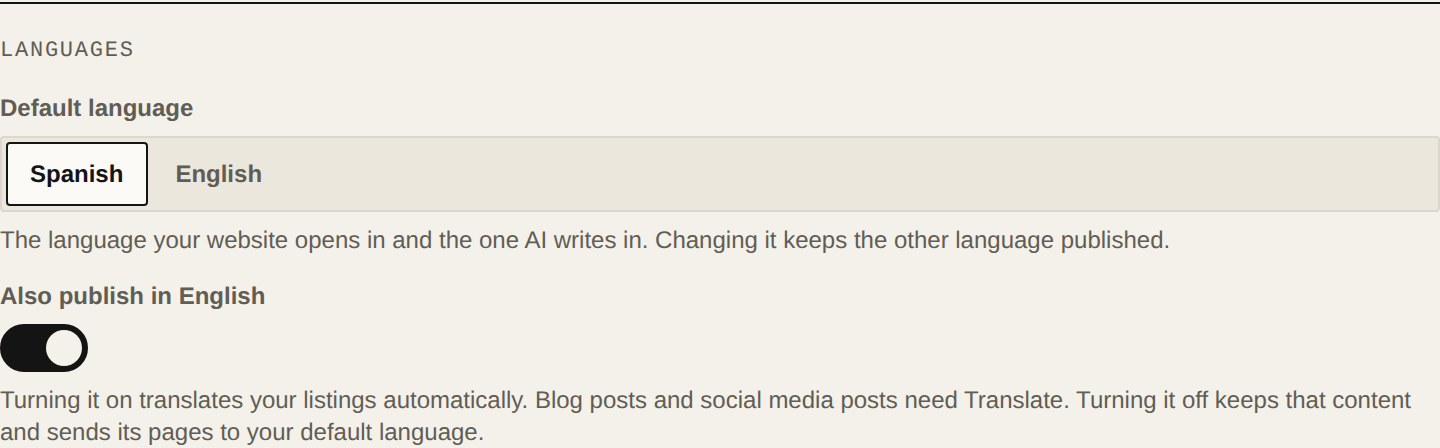
Choose the default language
Under Default language, tap Spanish or English. It's the language your site opens in and the one AI writes in. Changing it keeps the other language published. The change saves on its own and you'll see Settings saved.
Turn on the second language
Turn on the switch that says "Also publish in" and the other language. The change reaches your site straight away, without publishing anything else in the editor.
Let your listings translate
When you turn on the second language, your visible listings are translated automatically with AI. You can check and fix each translation in the listing.
Turn it off if you no longer need it
If you turn off the second language, that content is kept, and its pages send visitors to your default language. When you turn it back on, everything is still there.