📘 How it worksYour day: what Home shows you
What's due today, who's waiting for a reply and how your properties are doing, on one screen.
- Admin
- Agent
- ⏱ 1 min
- Updated October 6, 2026
The summary at the top
Under the date and the Today heading is Getting started, until you finish or dismiss its list. Then a sentence tells you how many leads are waiting for a first reply and how long the oldest has waited, or You're all caught up.. If any property has no Place, a notice takes you to them with Show them.
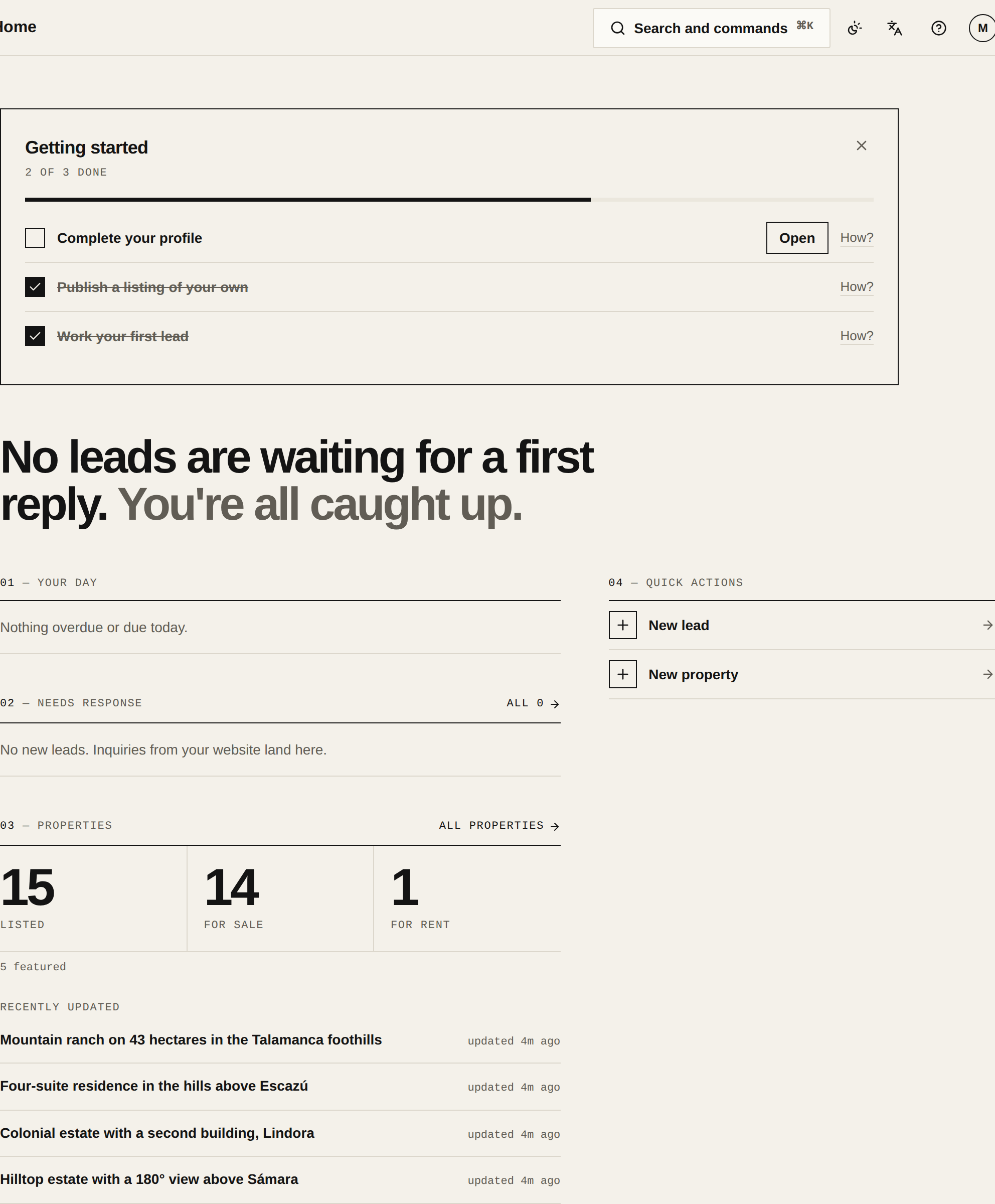
Your day and Needs response
Your day lists your activities that are overdue or due today. Tick them off right there, or tap the name to open the lead. Needs response shows up to six new leads, highest score first. Any that have waited more than 12 hours are marked in colour.
Properties and quick actions
Properties counts what's Listed, For sale and For rent, and lists the recently updated ones. Quick actions starts a new lead or a new property.
What changes with your role
An Agent sees only their own leads and the unassigned ones in Needs response. An Admin sees them all, and also gets Portals, which warns when a portal leaves properties out or its last fetch failed; Website, with the published version and any unpublished changes; and Import, with how the last import went.